Amazon Add to Cart But No Purchase? Full Guide
Amazon add to cart but no purchase: the five last-mile leaks
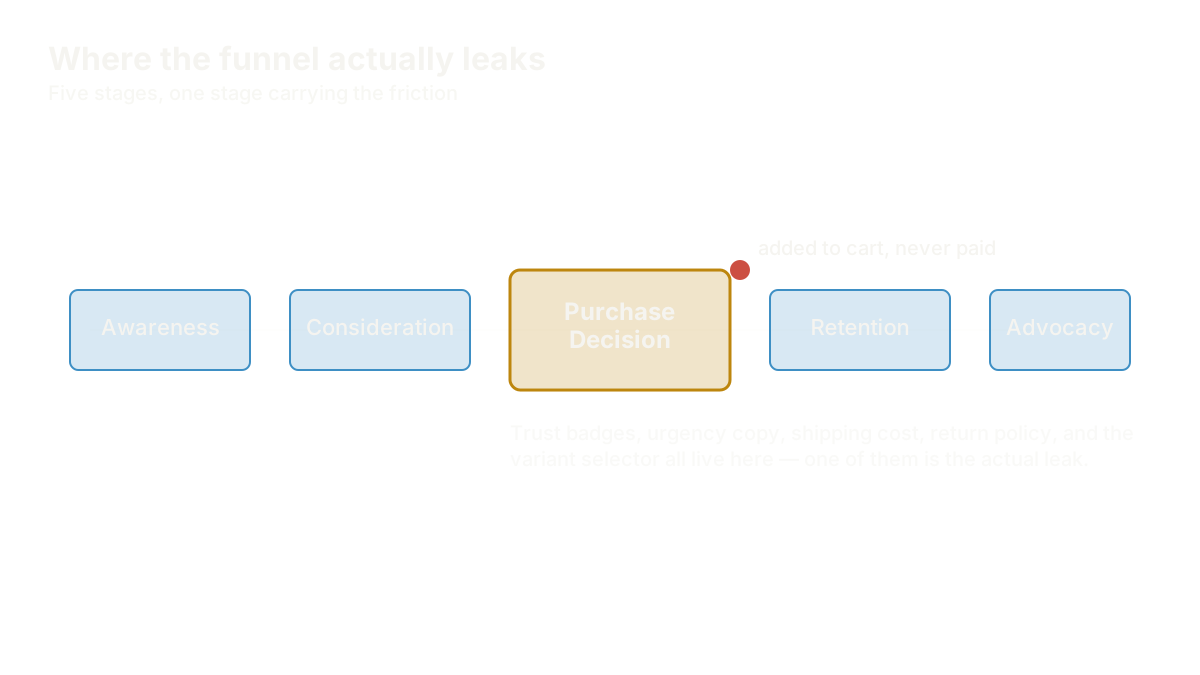
Amazon add to cart but no purchase means a shopper trusted your listing enough to click the button, then met a doubt at the very last step, and walked away. If you're an Amazon brand owner watching add-to-cart numbers that look healthy sit above a purchase number that doesn't, the leak usually isn't your product. It's one of five last-mile trust breaks: a trust badge that doesn't answer the buyer's specific fear, urgency messaging that reads as fake, a shipping cost that surprises them at checkout, a return policy they can't find, or a variant selector that adds friction instead of removing it. This guide diagnoses each one, tells you which actually move your Trust Gap score, and gives you a test plan that isolates one fix at a time.
Say your listing shows a 4.3% add-to-cart rate but only a 1.1% purchase rate, on traffic that hasn't changed in weeks. That gap is real information. It means the shopper got far enough to trust your main image, title, and price. Something between the buy box and the confirmation page is undoing that trust. The rest of this guide walks through where that undoing happens and how to find it on your own listing instead of guessing.
Why "add another badge" is the wrong first move
The instinct when a near-purchase stalls is to add more reassurance: another trust badge, a bolder urgency banner, a friendlier return-policy line. Each addition feels safe. None of them are free. A listing crowded with unearned claims reads as noisier, not more trustworthy, and Amazon's compliance team flags overclaiming faster than a shopper notices a missing seal.
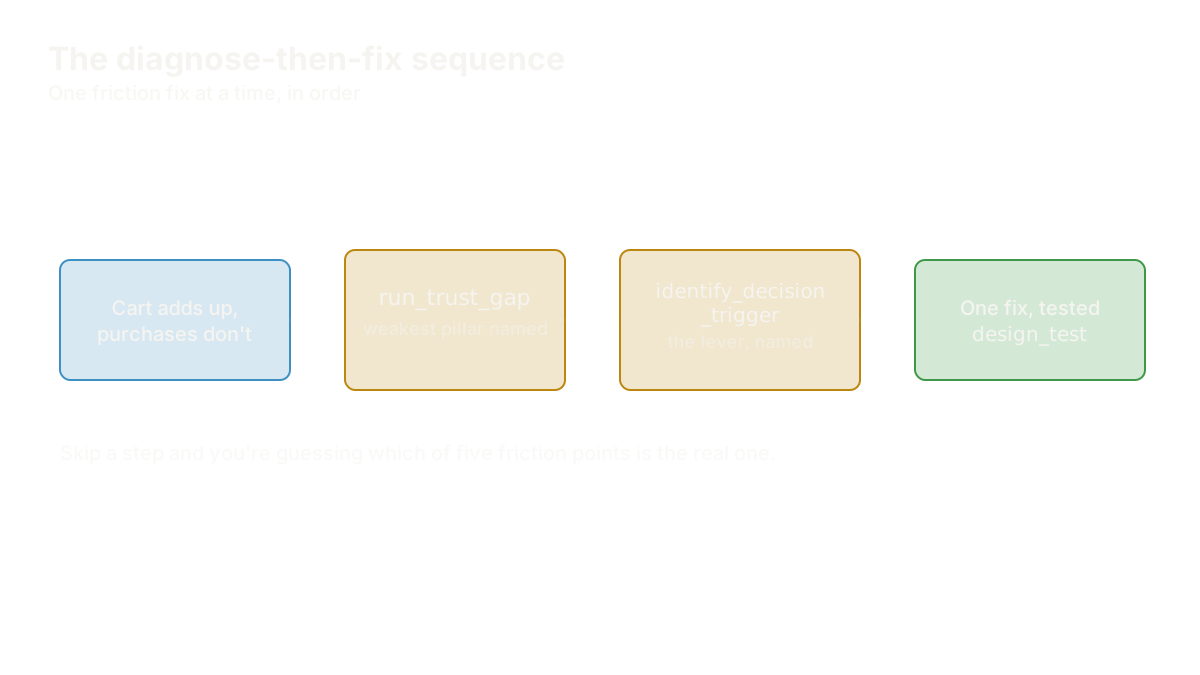
The better first move is diagnosis. run_trust_gap scores a listing across all four IDEA pillars (Insight-Driven, Distinctive, Empathetic, Authentic) and tells you which one is actually thin before you touch anything. A trust badge problem often isn't a proof problem at all; it's an Authentic problem, where the badge exists but doesn't connect to anything specific the buyer was worried about. Fixing the wrong pillar wastes a design cycle and leaves the real leak untouched.
Trust badges that aren't earning their keep
A badge is shorthand for a claim. It works when the shopper already knows what worry it's answering, and it reads as decoration when it doesn't. This is the single most common last-mile failure in this cluster: two or three visible trust signals, flat conversion, and a founder convinced the badges themselves must be broken. They're not broken. They're floating, disconnected from the specific fear the buyer walked in with. A supplements founder's trust badges weren't lifting her conversion rate until the coach traced the gap to a missing pillar, not a missing badge.
The fix changes by category. A baby-product brand needed to know which single safety badge actually reassures a first-time parent, because stacking every certification icon available dilutes the one that matters. And badges aren't risk-free additions: one founder's hassle-free-returns claim got her listing flagged because the badge asserted something her actual policy didn't back up. A trust signal that isn't true, or isn't provably true, is worse than no signal at all.
Fake urgency and the line the Trust Gap draws
Urgency messaging works when it's real and fails hard when it isn't. Shoppers have seen a thousand "Only 3 left!" banners that reset the next morning, and the Trust Gap score treats fabricated scarcity as an Authentic-pillar violation, not a clever conversion tactic. A skincare listing's "only 3 left" banner was quietly killing its trust score because the claim didn't match actual inventory. Shoppers who reload the page and see the same "3 left" the next week stop believing any urgency signal on that listing, including the true ones.
Countdown timers carry the same risk in a different shape. A home-gym brand's countdown banner was tanking its Trust Gap score even though the discount itself was legitimate, because a timer with no real deadline attached reads as manufactured pressure. The A+ Content module has its own version of this problem: a craft brand needed a seasonal urgency panel that wouldn't get flagged for the same overclaiming risk that catches urgency-messaging bullets. The rule that survives every category: urgency messaging only works when the shopper could verify it if they tried.
Shipping cost surprises and the invisible return policy
Two friction points sit even later in the funnel than badges and banners, and they're the ones a founder is least likely to notice because they only show up at checkout, off the listing page itself. A tool-storage brand watched shoppers add to cart, then abandon the moment a shipping cost appeared they hadn't anticipated. The price on the listing was accurate, but the total at checkout wasn't the number the shopper had mentally committed to.
Return policy works the same way in reverse: absence, not surprise, is the leak. A cookware brand's return policy was technically fine but effectively invisible, never surfaced anywhere near the buy box, so shoppers made the purchase decision without the one piece of information that would have resolved their hesitation. And when a return policy does get surfaced, it has to be accurate: a brand's "hassle-free returns" claim needed a hard compliance check against its actual international-shipping return terms before it could be published safely. Shipping and returns trust isn't decorative content. It's functional information the shopper needs before they'll finish the transaction.
The variant selector as its own trust break
A confusing variant selector is easy to overlook because it looks like a UI detail, not a trust problem, but it produces the exact same symptom as every other leak in this guide: the shopper adds to cart, hesitates over an unclear choice, and closes the tab rather than guess wrong. A toy brand's variation selector was quietly causing cart abandonment because the size and color options didn't map cleanly to what the main image showed, and the decision trigger driving that specific purchase, usually momentum, the shopper's readiness to just decide, got interrupted by a selector that demanded more thought than the moment could bear.
Placement: proof buried below the buy box
Even a real, well-earned trust signal fails if it's not where the shopper is looking when they hesitate. A pet-brand's reviews were buried well below the buy box instead of positioned at the exact moment a shopper's cursor hovers over "Buy Now" — the same proof, badly placed, does almost none of the work it could be doing. Placement is a free lever most founders never pull because it costs no redesign, just reordering what's already there.
Testing one friction fix at a time
The mistake that undoes good diagnosis is fixing everything at once. Change the badge, the banner, and the shipping copy in the same week and you'll never know which one moved the number — or whether any of them did. design_test structures a single hypothesis into a measurable change, and figuring out which trust element to test first is itself a diagnostic step, not a coin flip: it comes from the run_trust_gap score, not from whichever fix felt most urgent that morning.
Urgency messaging needs the same discipline. One founder ran the actual A/B test to see whether urgency messaging lifts conversion on her own listing rather than assuming the tactic works because a competitor uses it — the honest answer on her specific product was more nuanced than either "urgency always works" or "urgency never works." And the same test structure applies to offers that look like a checkout-friction fix but are really a pricing decision: a haircare brand's subscribe-and-save messaging needed its own controlled test before rolling it out past a single SKU.
The Shopify-checkout parity problem
Brands running Amazon and a Shopify DTC store side by side hit a version of this leak that's easy to miss because it looks like two separate problems. A candle brand's Shopify checkout trust badges didn't match what shoppers had just seen on Amazon, and the mismatch itself became the friction — a shopper who trusts your Amazon listing enough to visit your Shopify store, then meets a different set of trust signals (or none) at a different checkout, experiences that gap as a reason to hesitate. Trust signals need to travel with the brand across every checkout, not live only on the platform where you happened to build them first.
What to measure after any fix
Watch purchase rate against the same traffic mix you had before the change — if paid spend or seasonality shifted in the same window, you won't isolate the real signal. Give any single fix two to three weeks minimum before judging it; last-mile friction is subtle enough that a few days of noisy data will hide a real lift or mask a real failure. If the number doesn't move at all, that's information too: rerun run_trust_gap and check whether the pillar you fixed wasn't actually the binding constraint, or whether a different friction point on this list is the real one.
If you're not sure which of these five is actually happening on your own listing, the free diagnostic scores your Trust Gap in six questions and tells you where to look first.
FAQ
Why does my Amazon listing get add to carts but no purchases?
A shopper who adds to cart has already trusted your image, title, and price — the drop-off after that point is a last-mile friction problem, not a listing-quality problem. The most common causes are trust badges that don't answer a specific fear, urgency messaging that reads as fake, an unexpected shipping cost at checkout, an invisible return policy, or a confusing variant selector. Run run_trust_gap to find which one is actually happening on your listing before changing anything.
Do trust badges actually increase Amazon conversion rate?
Only when the badge connects to a specific worry the buyer already has — a generic seal stacked next to generic bullet copy reads as decoration, not proof. identify_decision_trigger finds the actual psychological lever your buyer responds to, and audit_asset checks whether your existing badges speak to it. Adding a third badge before running that diagnosis usually doesn't move the number.
Is fake urgency messaging against Amazon's policies?
Urgency claims that don't match reality (a "3 left" banner that resets nightly, a countdown timer with no real deadline) put your listing at risk of a compliance flag, separate from the trust damage they do with shoppers who notice the pattern. The Trust Gap score treats unverifiable urgency claims as an Authentic-pillar failure. Urgency messaging that a shopper could verify if they tried is the only kind worth using.
Why do shoppers abandon cart over shipping costs on Amazon?
A shipping cost that appears at checkout but wasn't visible on the listing breaks the mental total the shopper had already committed to, even when the final price is accurate. The fix is surfacing real shipping and return terms earlier in the funnel — near the buy box, not buried in policy pages the shopper never opens before adding to cart.
How do I know which trust fix to test first?
Run run_trust_gap before testing anything; the weakest pillar tells you where the leak most likely lives. Then use design_test to isolate exactly one change — one badge, one banner, one policy line — and measure it for two to three weeks against stable traffic. Testing multiple friction fixes in the same window makes it impossible to know which one, if any, actually moved your purchase rate.
Every leak in this guide produces the same symptom on your dashboard: a healthy add-to-cart number sitting above a purchase number that won't move. Amazon add to cart but no purchase is not a product problem or a pricing problem — it's a diagnosis problem, and the five places to look are the trust badge, the urgency line, the shipping cost, the return policy, and the variant selector. Run the Trust Gap, name the trigger, test one fix, and you'll know within three weeks which of them was actually costing you the sale.
Find the Trust Gap costing you sales
The free IDEA Brand Coach diagnostic reads your listing and your reviews, then shows you where your read of your brand and your customers' differ. 4 questions while it works. No account needed for your score; create a free one to keep the full read and your design brief.
Run the free diagnostic →