Amazon Bullet Points Not Converting? Full Diagnosis
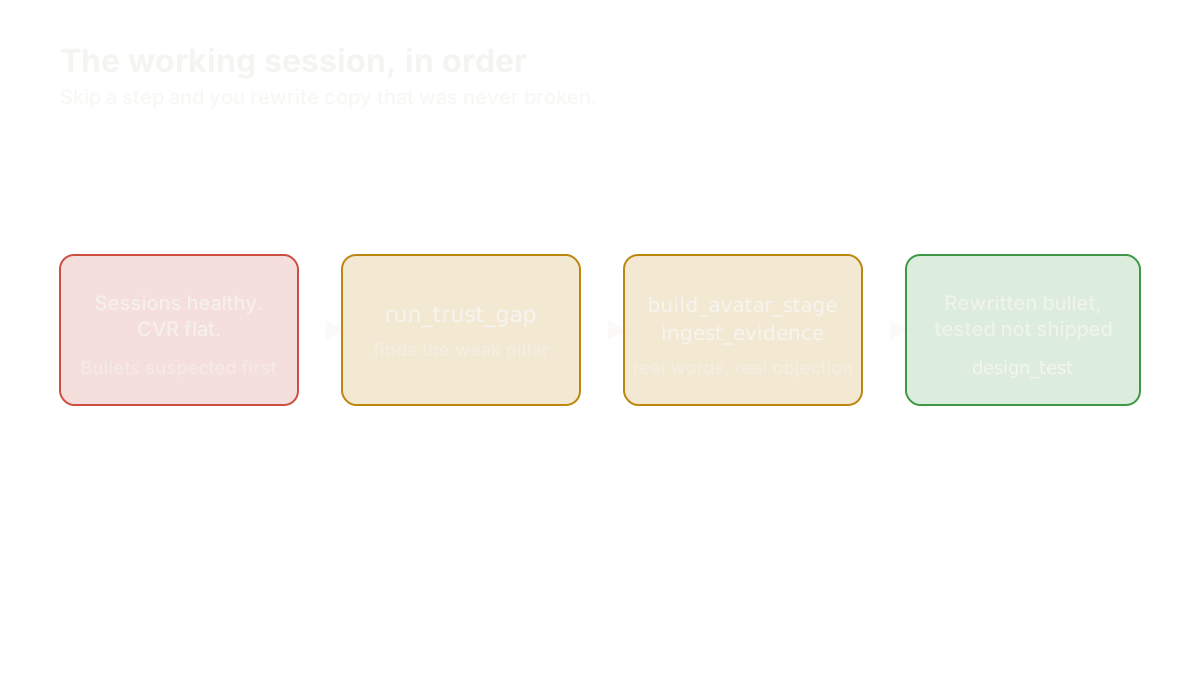
"Amazon bullet points not converting" is the diagnosis Amazon brand owners reach for the moment sessions look healthy and the sale still doesn't land. Traffic is doing its job. Add-to-cart is doing its job. Something between the click and the checkout is failing, and the instinct is to open the listing and start rewriting bullet one. Don't, yet. The correct order is: rule out the click side of the listing, run a trust-gap read across all four buyer-trust pillars, mine the evidence you already have for the objection you're missing, then rewrite in the customer's actual words and test it. Skip a step and you rewrite copy that was never the problem.
This guide is the full map. Every section below links to a deeper diagnosis of one specific failure mode, each with its own founder, its own tool sequence, and its own before-and-after. Use this page to find which one is yours.
Amazon Bullet Points Not Converting? Rule Out a CTR-vs-CVR Mismatch First
Before you touch a single word, separate a click-side problem from a copy-side problem. If your click-through rate just moved (a new main image, a title change, a price shift) and your conversion rate dropped at the same time, the bullets may be fine. A different image can pull in a different, less-qualified slice of shoppers who click for a reason your listing was never written to satisfy, and the resulting CVR drop looks exactly like a copy failure from the dashboard.
Say a kitchen brand swaps its main image to a brighter, more "premium" shot. CTR climbs. CVR falls the same week. The founder's first move is usually to blame the bullets. The actual cause: the new image now attracts shoppers expecting a materially different price point, and the copy never changes to meet them, because the copy was never the thing that moved. That's why CVR can drop right after a new main image goes live, and it's the single most common false positive in a "bullets not converting" diagnosis. Check what changed upstream before you rewrite anything downstream.
If nothing upstream moved and CVR has been flat or sliding for a while with steady traffic, the copy is a fair suspect. Move to the next step.
Run a Trust-Gap Read Across All Four Pillars Before You Touch a Bullet
The IDEA framework scores a listing across four pillars: Insight-Driven, Distinctive, Empathetic, Authentic. A conversion problem in the copy almost always traces to exactly one of these being weak while the other three read fine. That's exactly why "just rewrite it, tighter" so often fails: tighter copy that's still missing the same pillar just repeats the same gap in fewer words.
Run run_trust_gap before you draft anything. It scores the listing against real customer evidence rather than a guess, and it tells you which pillar is actually dragging conversion down.
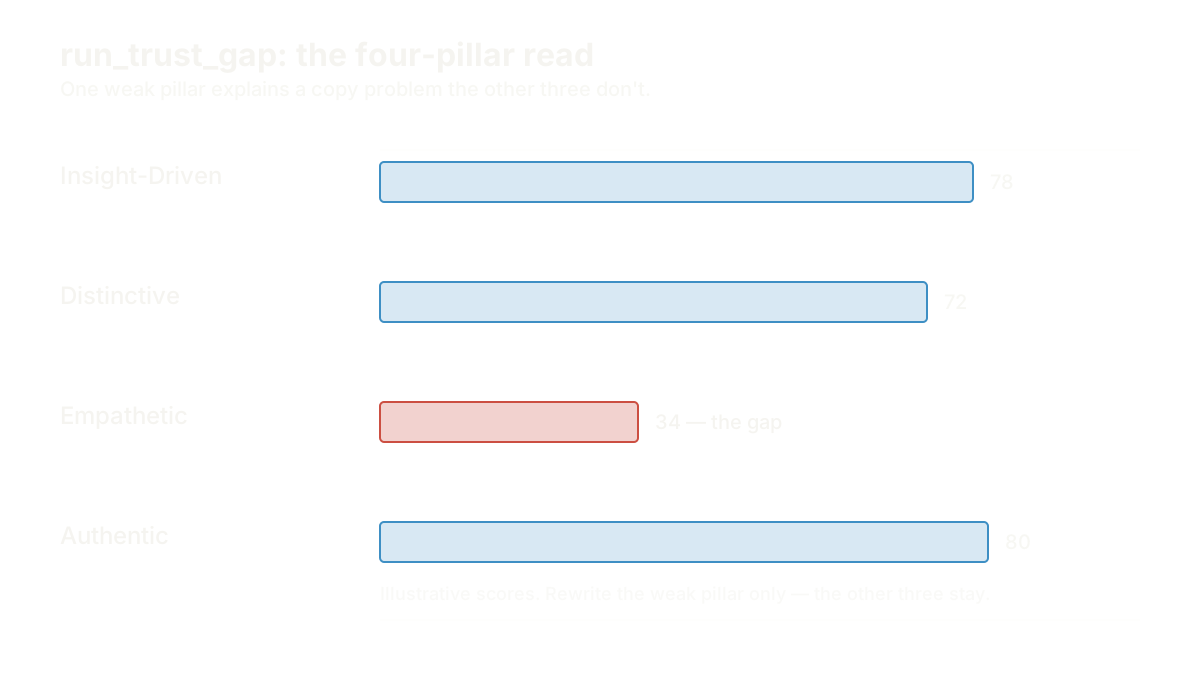
Four patterns show up constantly, and each has its own supporting diagnosis:
- Empathetic pillar weak. The bullets are accurate but don't feel like they were written for this specific buyer's actual worry. This is the empathetic-pillar gap that shows up in a pet-supplement listing with healthy reviews and flat conversion anyway — proof the product works isn't the same as proof the copy understands the buyer.
- Insight-Driven pillar weak. Every spec is listed and none of it gives the shopper a reason to decide today. That's a feature dump with no decision trigger — accurate copy that never turns into permission, momentum, or any of the other five triggers a real buyer needs before checkout.
- Distinctive pillar weak. Bullet one reads like every other listing in the category, because it was written from the product spec sheet instead of from what makes this brand different. That's bullet one sounding like every competitor's bullet one — a differentiation gap, not a clarity gap.
- Wrong buyer entirely. Sometimes the trust-gap score comes back mixed across all four pillars because the copy is written for a buyer who isn't the one actually landing on the page. A full listing copy audit catches this when the other three checks don't explain the gap on their own.
Whichever pillar comes back weakest, that's the one section of copy you rewrite first. Everything else stays.
Mine Reviews and Competitor Listings for the Objection You're Missing
Once you know which pillar is weak, don't guess at the fix from memory. The evidence for what to say instead is usually sitting in your own reviews and in the ASINs beating you.
Run ingest_evidence against your review history, and read the three- and four-star reviews as closely as the five-star ones. A recurring complaint that never shows up in your bullets is the objection your copy needs to answer before a hesitant buyer will convert. This is exactly how a recurring review complaint exposes a listing blind spot on a baby-product listing where the fix wasn't a new claim, it was addressing a worry customers were already voicing in public.
The same tool run against a competitor's ASIN answers a different, related question: why is a cheaper, arguably weaker product outselling yours? Nine times out of ten it isn't price. It's that the competitor's copy closes an objection yours leaves open. That diagnosis, why a cheaper competitor outsells you, usually turns up the exact sentence your bullets are missing, sitting in someone else's listing in plain sight.
Between your own reviews and a competitor's copy, you now have real evidence for what to say. That's the material for the rewrite. Guessing from the product spec sheet again would just reintroduce the same gap in new words.
Write in the Customer's Actual Vocabulary, Not the Product's
Here's the failure mode that survives even a correct trust-gap diagnosis: the founder identifies the right pillar, gathers the right evidence, and then rewrites the bullet in language that's still technically accurate and still not how the customer would describe their own problem. "Third-party tested, bioavailable formula" is true. It is not what a tired customer typing into the Amazon search bar at midnight would ever say out loud.
Run build_avatar_stage, starting at its S1 vocabulary stage, which pulls the words your actual customers use rather than a generic buyer-persona template. This is the same mechanism behind the bullet-point rewrite for a supplements brand whose copy didn't sound like its own customers — the accurate claim didn't change, the words wrapping it did, because the gap was never accuracy. It was vocabulary.
The test for a rewrite is simple: read your bullet one out loud, then read the top phrase from your own five-star reviews out loud. If they don't share a word, you haven't finished the rewrite yet, no matter how clean the sentence reads.
Test the Rewrite Instead of Shipping It on a Hunch
A rewrite grounded in a real trust-gap diagnosis and real customer vocabulary is still a hypothesis until you measure it. Don't swap the live copy and hope. Structure the change as a real test.
Run design_test to turn the rewrite into a hypothesis with a defined before-and-after and a measurement window, rather than an unstructured "let's see what happens" edit. That's the discipline behind structuring an A/B test for bullet copy instead of guessing at the result: you need to know, after the fact, whether the copy moved CVR or whether something else did.
If the trust-gap read surfaced more than one plausible fix, don't ship all of them stacked into one rewrite; you'll never know which change did the work. This is where choosing between three copy directions for one listing matters — pick the direction the evidence supports most strongly, test that one, and hold the others for a follow-up round if the first test doesn't move the number enough on its own.
Once the test has run its full window, compute_trust_gap_lift gives you the before-and-after delta on the pillar you targeted, not just a raw CVR number that could be explained by something else entirely.
The Special Case: Copy Pasted Straight From Amazon Onto a Shopify PDP
One failure mode deserves its own callout because it's so common and so avoidable: brands that copy their Amazon bullets verbatim onto a Shopify product page and wonder why the DTC conversion rate lags. Amazon bullet copy is written for a shopper scanning a search-results page who's already primed by category and price; a Shopify visitor usually arrived through an ad or a link with a completely different context and needs the page itself to do more work.
That mismatch is exactly why Amazon copy fails when it's copy-pasted straight onto a Shopify product page — the words aren't wrong, the format and the missing context are. If your team is planning a fuller PDP rebuild rather than a copy patch, a vague "make it feel more premium" design brief is the other half of that failure: a designer can't fix a conversion problem from an adjective, they need the same trust-gap evidence your Amazon rewrite used.
What to Measure After Any of These Fixes
Whichever pillar you fixed, measure the right number. A vocabulary or Empathetic-pillar fix should move CVR specifically among sessions that reach the bullet section, not headline CVR alone — a CTR problem elsewhere on the page won't move from a copy change and shouldn't be read as proof the fix failed. A Distinctive-pillar fix (a genuine repositioning, not just new adjectives) is worth watching over a longer window, since differentiation earns trust more slowly than an objection-handling fix does. In every case, compute_trust_gap_lift tells you whether the specific pillar you targeted actually moved, which is a cleaner signal than watching total sales alone.
The Next Action
If your Amazon bullet points not converting is the number staring back at you this morning, don't open the listing editor yet. Run run_trust_gap first. It takes minutes, and it tells you which of the four pillars is actually weak — which is the one piece of information that decides everything else in this guide.
FAQ
Why are my Amazon bullet points not converting even though traffic looks fine?
Healthy traffic with flat conversion usually means the copy is failing to close a specific gap: a missing decision trigger, a vocabulary mismatch, a missing differentiator, or a trust-badge and policy issue lower on the page. Run a trust-gap read before rewriting anything, because "not converting" can trace to any one of several different, unrelated causes that each need a different fix.
How do I know if it's my bullet points or my main image causing the drop?
Check whether your click-through rate changed recently. If CTR moved (new image, new title, new price) at roughly the same time CVR dropped, the click-side change is the more likely cause, not the copy. If CTR has been stable and CVR alone has drifted or sat flat for weeks, the bullets are a fair suspect.
What's the fastest way to audit Amazon listing copy?
Start with a trust-gap read across the four IDEA pillars to find the weakest one, then mine your own three- and four-star reviews for a recurring objection your copy never addresses. Those two steps together usually surface the actual gap faster than a line-by-line copy edit would.
Should Amazon bullet points sound different from Shopify product page copy?
Yes, generally. Amazon bullets are read by a shopper who's already scanning a category and comparing listings side by side; a Shopify page usually needs to establish context, trust, and differentiation on its own, since the visitor didn't arrive through a search-results comparison. Copy-pasting one straight onto the other usually under-serves whichever channel it wasn't originally written for.
How long should I test new bullet copy before judging the result?
Long enough to cover normal week-to-week traffic variance for your listing, and long enough that a single unusual day or a temporary ranking fluctuation doesn't skew the read. Structure the change as a defined test with a clear before-and-after window rather than an open-ended "see how it goes" edit, so you can measure the actual lift instead of guessing at it after the fact. Whatever the window, don't cross "amazon bullet points not converting" off your list until the test confirms it, not just the calendar.
Find the Trust Gap costing you sales
The free IDEA Brand Coach diagnostic reads your listing and your reviews, then shows you where your read of your brand and your customers' differ. 4 questions while it works. No account needed for your score; create a free one to keep the full read and your design brief.
Run the free diagnostic →